Percentage Increase vs. Percentage Points: How to Calculate Rates, Changes, and Discounts
Table of Contents
- Three Core Concepts: Three Concrete Examples
- Mathematical Formulas and the Baseline Effect
- GoToolstack Percentage Calculator: Supported Operations
- Official Eurostat Guidance on Percentage vs. Percentage Points
- Practical Summary Checklist
- GoToolstack Financial & Mathematical Utilities
- Technical References & Official Standards
1. Three Core Concepts: Three Concrete Examples
In financial reporting, economic news, and retail discounts, percentages are frequently conflated. To avoid costly statistical errors, separate these three scenarios with concrete numbers:
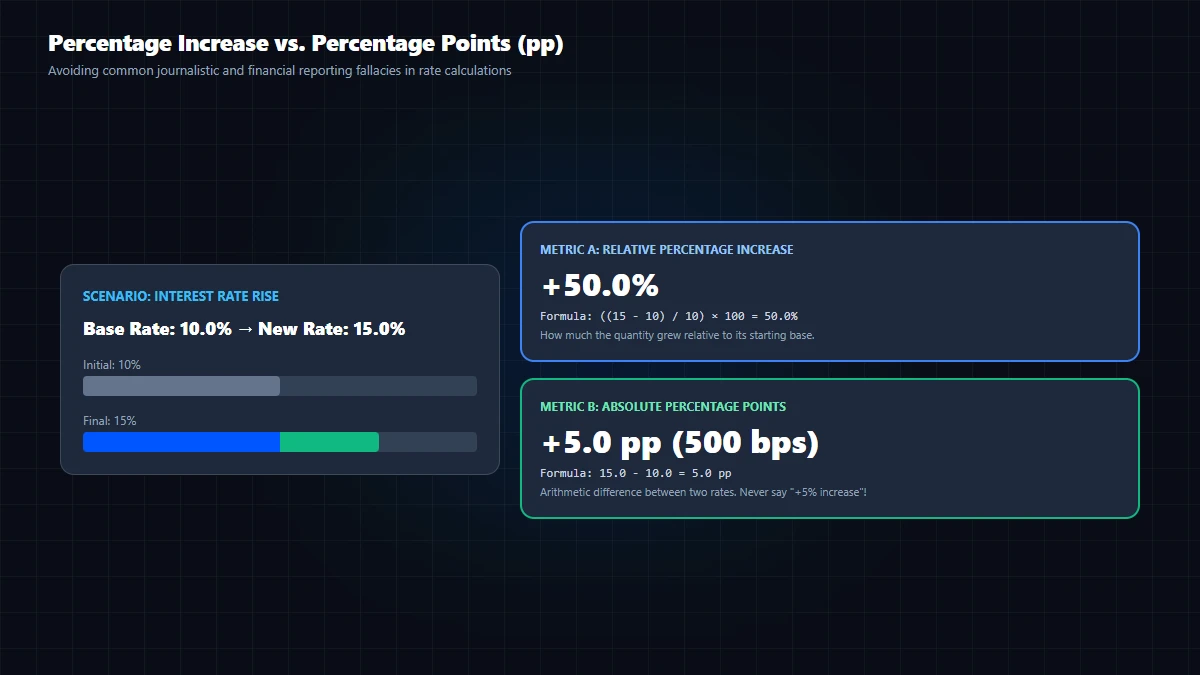
Scenario 1: Percentage Increase (Relative Change)
A product price rises from |-50|100 to |-50|120. The price increased by 20%:((120 - 100) / 100) × 100 = +20%.
Scenario 2: Percentage Points (Arithmetic Difference of Rates)
A central bank interest rate rises from 20% to 25%. This is an increase of 5 percentage points (pp) (25% - 20% = 5 pp). However, relative to the initial interest rate, it represents a 25% relative surge in borrowing costs: ((25 - 20) / 20) × 100 = 25%! Conflating '5%' with '5 percentage points' is a major misreporting error.
Scenario 3: Successive Changes (The Asymmetric Discount Trap)
An item priced at |-50|100 increases by 20% to |-50|120. The retailer then offers a 20% discount. The final price is |-50|96, NOT |-50|100!
Because 20% of |-50|120 is |-50|24: 120 - 24 = |-50|96. A price increase and an equal percentage discount never cancel each other out.
Discount Calculator or dedicated VAT Calculator for tax breakdowns.
2. Mathematical Formulas and the Baseline Effect
The standard percentage change formula between an initial value (V1) and a final value (V2) is:
Δ% = ((V₂ - V₁) / |V₁|) × 100Why the baseline (V1) determines everything:
- Division by Zero: If the initial value is zero (
V1 = 0), the formula fails because division by zero is mathematically undefined. You cannot express a change from 0 to 50 as a percentage increase. In the GoToolstack Percentage Calculator, entering A = 0 in the Change tab correctly displays Undefined. - Negative Baselines: If a company goes from -|-50|50 (net debt) to +|-50|50 (net profit), using |-50|||-50| yields +200%, but in financial accounting, transitions across zero are generally reported as absolute dollar amounts (|-50|100 turnaround) rather than percentages, because negative bases distort economic meaning.
- Rounding Traps: Fractions like 1/3 produce repeating decimals (33.333...%). Always specify precision (e.g. 2 decimal places: 33.33%).
3. GoToolstack Percentage Calculator: Supported Operations
GoToolstack's in-browser Percentage Calculator supports three specific calculation modes:
- Mode 1 ('of'): Calculates X% of Y (e.g.,
15% of 200 = 30). - Mode 2 ('share'): Calculates what percentage X is of Y (e.g.,
30 of 200 = 15%). If Y = 0, it outputs Undefined. - Mode 3 ('change'): Calculates relative percentage change from A to B (e.g.,
80 to 100 = +25%;100 to 120 = +20%). If A = 0 and B ≠ 0, it outputs Undefined.
Honest Tool Boundaries: The tool does NOT include a dedicated percentage point subtraction tab (since 25 - 20 = 5 is basic subtraction), nor does it simulate multi-tier compound discounts in a single step. For multi-tier discounts, use our dedicated Discount Calculator in the Business category. Our calculator contains no live tax rates or investment advice.
4. Official Eurostat Guidance on Percentage vs. Percentage Points
The Statistical Office of the European Union (Eurostat) explicitly cautions in its Statistics Explained standards:
Official Eurostat Guidance Summary: The European Union statistical office (Eurostat), in its Statistics Explained guide, clarifies that a percentage point (pp) expresses the direct arithmetic difference between two percentage rates, whereas percentage change (%) expresses the relative growth relative to the baseline value. For example, a rate rising from 40% to 44% represents an increase of 4 percentage points, but a relative increase of 10%.
5. Practical Summary Checklist
- Use percentage change (%) when comparing relative growth of a quantity against its past self.
- Use percentage points (pp) when comparing two interest rates, unemployment rates, or market shares directly.
- Remember that +X% followed by -X% always results in a net loss:
(1 + r) * (1 - r) = 1 - r^2 < 1. - Never divide by zero; changes from zero require absolute metrics.
6. GoToolstack Financial & Mathematical Utilities
Execute accurate calculations client-side with zero telemetry and zero server uploads:
Technical References & Official Standards
- Eurostat Statistics Explained: Statistical concepts – Percentage and percentage points (Distinguishing relative change from absolute difference).
- ISO 80000-2:2019: Quantities and units – Part 2: Mathematics (Mathematical signs, symbols, and operators to be used in natural sciences and technology).
- NIST Special Publication 811: Guide for the Use of the International System of Units (SI) (Rules for expressing percentages, parts per million, and uncertainty).