Image Compression Formats, Quality & Size Guide: WebP, JPEG, PNG, AVIF
Table of Contents
- Which Format and Quality Should You Choose? Practical Guide
- Format Comparison & Browser Encoder Reality Matrix
- Critical Technical Distinctions: Encoders, Transparency & Resizing
- Synthetic Browser Measurements via HTML5 Canvas
- Why File Size Increases (+%X Warning Explained)
- Met the KB Target but Won't Upload? Portal Constraints Explained
- Tool Capabilities, Processing Architecture, and Browser Boundaries
- Technical References & Official Standards
1. Which Format and Quality Should You Choose? Practical Guide
Selecting the optimal format and quality factor depends on image content and distribution requirements:
- Photographs and continuous-tone scenes: WebP (quality 75% – 80%) or JPEG (quality 75% – 80%). This range provides a balanced starting point for photographic content, maximizing byte reduction before visible macroblock artifacts appear.
- Transparent graphics, icons, and logos: WebP (alpha channel fully preserved) or PNG (lossless). Never save transparent images as JPEG; JPEG does not support transparency and transparent areas turn opaque white in our tool.
- Screenshots, diagrams, and sharp text: PNG or lossless WebP. The JPEG algorithm produces ringing artifacts (halos) and blurring around letterforms and high-contrast edges.
Separating Heuristics, Benchmarks, and Compression Realities:
- General Heuristic: A quality setting of 75%–80% (0.75–0.80) is an established operational heuristic for web publishing, balancing visual fidelity with payload reduction.
- Measured Benchmarks: In controlled synthetic benchmarks on uncompressed graphic fixtures (detailed in Section 4 below), file sizes dropped by 70% to over 95%. However, those figures represent an uncompressed starting state; real-world photos with noise, complex textures, or prior compression will see varied byte reductions. Compressing an already minimal icon or heavily optimized image can yield negligible savings or even increase file size (+%X).
- Loss Reality & No Universal Guarantee: Lossy compression mathematically discards high-frequency spatial color information. There is no unconditional guarantee of “zero perceptible loss” or a uniform 80%–95% reduction across all files. High-contrast line art, fine typographic details, and repeated re-compressions inevitably suffer degradation.
2. Format Comparison & Browser Encoder Reality Matrix
Supported output formats and their real encoder behaviors in the GoToolstack Image Compressor:
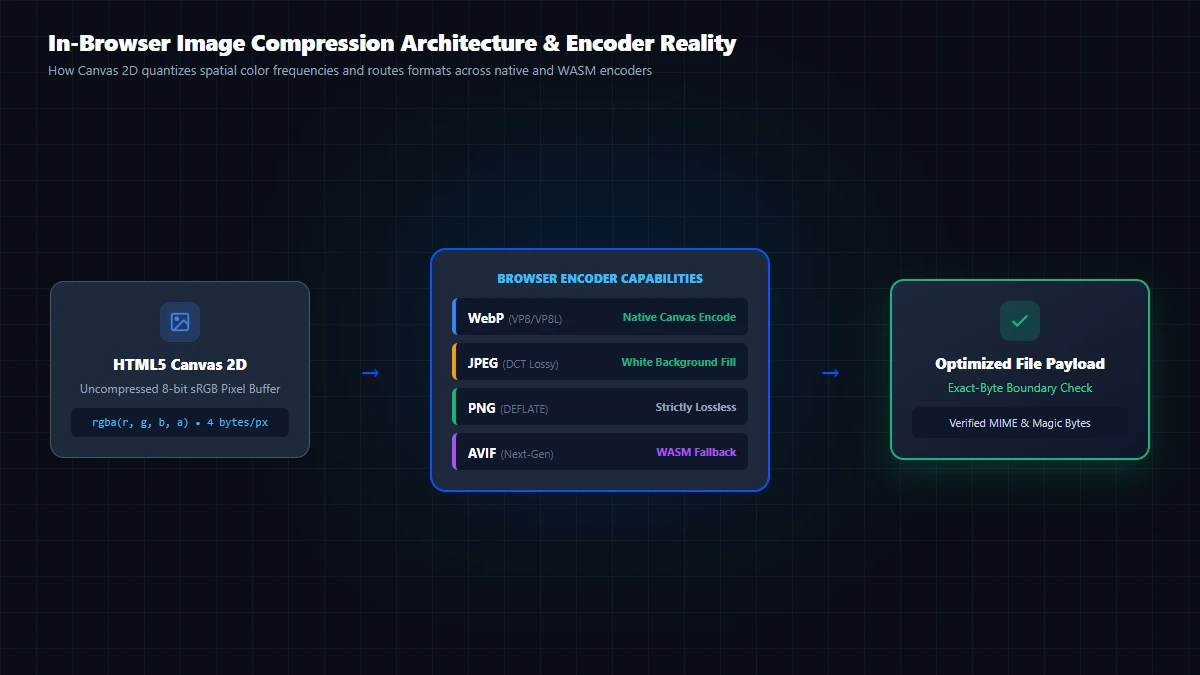
| Format | Compression Type | Alpha Transparency | Quality Slider Impact | Browser Encoder Reality |
|---|---|---|---|---|
| WebP (.webp) | Lossy (VP8) & Lossless (VP8L) | Supported (Alpha fully preserved) | Directly controls quantization matrix across 0.10 – 1.00 | Native HTML5 Canvas encode widely supported across modern Chromium, Safari, and Firefox. |
| JPEG (.jpg) | Lossy (Discrete Cosine Transform / DCT) | Not supported by spec | Controls DCT quantization across 0.10 – 1.00 | Native Canvas encode supported universally. Transparent areas filled with white as an application choice. |
| PNG (.png) | Lossless (DEFLATE / LZ77) | Supported (8-bit and 24-bit alpha) | Ignored: Quality slider has 0 effect on PNG byte size | Native Canvas encode is strictly lossless; W3C specification ignores the quality parameter completely. |
| AVIF (.avif) | Lossy & Lossless (AV1) | Supported (Preserves alpha) | Controls AV1 quantizer via WASM or native encoder | Decode ≠ Encode: Native Canvas encoding is unsupported in HeadlessChrome 155; GoToolstack routes AVIF through a client-side WebAssembly encoder. |
3. Critical Technical Distinctions: Encoders, Transparency & Resizing
1. AVIF Decode Support Is NOT Native Encode Support
A widespread developer misconception is assuming that because a browser displays AVIF images (decode support), its HTML5 Canvas API can export AVIF files (encode support). In reality, tests on Chromium 155 (HeadlessChrome 155.0.0.0) reveal that calling canvas.toBlob(r, 'image/avif') fails native encoding (nativeAvifEncode: false). Following the W3C Canvas specification, the browser silently falls back to image/png. To guarantee authentic AVIF generation, GoToolstack tests canvas support via canCanvasEncodeAvif() and transparently activates an in-browser WebAssembly encoder (/vendor/avif/wasm_avif.wasm) when native encoding is unavailable.
2. PNG Quality Parameter Is Fully Ignored by Canvas
In standard browser Canvas implementations, calling canvas.toBlob(callback, 'image/png', 0.2) does not produce a low-quality PNG. The W3C specification mandates lossless DEFLATE encoding for PNG, completely ignoring the numeric quality parameter. The quality slider in GoToolstack reflects this reality: PNG output remains bit-identical whether quality is set to 0.10 or 1.00.
3. JPEG White Background Fill: An Application Choice, Not a Canvas Guarantee
An uninitialized HTML5 Canvas 2D composite buffer defaults to transparent black (rgba(0, 0, 0, 0)). Because the JPEG standard (ITU-T T.81) lacks an alpha channel, converting a bare transparent canvas directly to JPEG renders transparent pixels as solid black. To provide an intuitive outcome, the GoToolstack Image Compressor explicitly paints an opaque white rectangle (ctx.fillStyle = '#ffffff'; ctx.fillRect(0, 0, w, h)) before drawing the image when JPEG is selected. This is an application-specific design choice, not an inherent guarantee of the HTML5 Canvas specification.
4. Resizing (Changing Dimensions) vs. Quality Reduction
Resizing alters spatial pixel dimensions (such as shrinking 4000×3000 px to 1200×900 px), reducing the pixel grid. For pure dimension adjustments, use the Image Resizer. Quality reduction keeps pixel dimensions constant while adjusting quantization matrices to discard high-frequency color variations. In Target File Size mode, the engine searches quality levels iteratively; an optional proportional downscaling toggle allows controlled dimension reduction only when the byte limit cannot be satisfied at original resolution.
4. Synthetic Browser Measurements via HTML5 Canvas
To substantiate numerical claims, repository synthetic test fixtures were evaluated on a Chromium 155 (HeadlessChrome 155.0.0.0 Windows x64) engine on October 15, 2026 using the standard HTML5 Canvas 2D toBlob() API:
Scenario A: Opaque Synthetic Graphic (800×600 px PNG, Original: 297,270 Bytes / 290.3 KB)
| Target Format | Quality Setting | Output Size | Measured Size Delta | Visual & Codec Assessment |
|---|---|---|---|---|
| WebP | 80% (Recommended) | 8,300 bytes (8.1 KB) | -97.2% reduction | Crisp edges, imperceptible color loss |
| WebP | 60% | 6,716 bytes (6.6 KB) | -97.7% reduction | Minor softening on contrast transitions |
| JPEG | 80% | 13,871 bytes (13.5 KB) | -95.3% reduction | Natural tones, slight block matrix |
| JPEG | 60% | 10,863 bytes (10.6 KB) | -96.3% reduction | Slight blur on fine line borders |
| PNG (Re-encoded) | 100% Lossless | 297,270 bytes (290.3 KB) | 0.0% change | Exact pixel-by-pixel mathematical match (quality ignored) |
Scenario B: Transparent Synthetic Graphic (800×600 px PNG, Original: 28,766 Bytes / 28.1 KB)
| Target Format | Quality Setting | Output Size | Measured Size Delta | Transparency & Visual Fidelity |
|---|---|---|---|---|
| WebP | 80% (Recommended) | 8,474 bytes (8.3 KB) | -70.5% reduction | Alpha transparency fully preserved, clean edges |
| WebP | 60% | 7,664 bytes (7.5 KB) | -73.4% reduction | Alpha transparency fully preserved, minor softening |
| JPEG | 80% | 14,343 bytes (14.0 KB) | -50.1% reduction | Transparency lost: Filled with white (#ffffff) by application composite |
| JPEG | 60% | 11,373 bytes (11.1 KB) | -60.5% reduction | Transparency lost: Filled with white (#ffffff), slight DCT ringing |
| PNG (Re-encoded) | 100% Lossless | 28,716 bytes (28.0 KB) | -0.2% change | Alpha transparency and color fidelity fully intact |
5. Why File Size Increases (+%X Warning Explained)
When compressing an already minimal icon (under 1–2 KB) or an image with very few colors, the output file can occasionally be larger (+10% to +40%) than the original. The underlying technical causes are:
- JPEG and WebP specifications mandate container headers, Huffman frequency tables, color maps, and quantization matrices.
- If the input image contains minimal raw payload, this fixed metadata overhead exceeds the bytes discarded by compression.
- The GoToolstack Image Compressor detects this scenario automatically, displays a red
+%Xwarning notice, and highlights theDownload Originalaction to protect file efficiency.
6. Met the KB Target but Won't Upload? Portal Constraints Explained
A common user frustration occurs when an image is successfully compressed below a portal's stated size ceiling (such as 200 KB or 500 KB), yet the destination system rejects the upload. In web applications and administrative submission forms, successful acceptance requires passing four distinct technical criteria:
1. Byte Unit Discrepancies (Decimal KB vs. Binary KiB)
Portals stating “Maximum 500 KB” often calculate file thresholds using decimal SI units (500,000 bytes) rather than binary IEC kibibytes (512,000 bytes). If an export produces 508,000 bytes, it satisfies a 500 KiB limit but fails a strict 500 KB ceiling. The GoToolstack Image Compressor Target File Size mode provides explicit unit selectors (KB = 1,000 B, KiB = 1,024 B, MB, MiB) with real-time exact-byte validation (blob.size <= targetBytes) so you can match the portal's exact byte calculation.
2. MIME Type and Container Extension Validation
Many government, visa, university, and banking portals whitelist only strict JPEG (image/jpeg, .jpg / .jpeg) or PNG (image/png) formats, rejecting modern WebP or AVIF containers regardless of byte size. Furthermore, server-side validation checks binary magic byte signatures (e.g., FF D8 FF for JPEG, 89 50 4E 47 for PNG); simply renaming a .webp file to .jpg fails server inspection. The Image Compressor verifies valid MIME containers upon export.
3. Pixel Dimension and Aspect Ratio Constraints
Submission forms frequently mandate minimum or exact pixel dimensions (such as “minimum 600×600 px” for biometric visa photos or “at least 1200 px on the longest edge” for catalog images). If an image meets a low KB threshold only because its pixel grid was drastically reduced, the portal's validator will reject it for failing resolution rules. In the Target File Size mode, users can configure optional minimum width and height limits, preventing automatic resizing from breaching portal constraints. For dedicated dimension adjustments and aspect-ratio locking prior to compression, use the Image Resizer.
4. Readability and Legibility Criteria
Forcing high-complexity assets (such as national ID cards, driver's licenses, or contracts) into an excessively small byte ceiling (e.g., under 50 KB) forces extreme quantization or downscaling. Even if the file passes automated byte gates, automated optical character recognition (OCR) or human reviewers will reject the submission if signatures, small typography, or biometric facial features become pixelated, banded, or illegible.
7. Tool Capabilities, Processing Architecture, and Browser Boundaries
The GoToolstack Image Compressor operates entirely client-side. Your images are never transmitted to external servers and are encoded directly in your device's browser memory.
Canvas Resolution Boundary: Image processing runs through the HTML5 Canvas 2D engine. On mobile platforms (particularly iOS Safari), canvases exceeding 16.7 megapixels (roughly 4096×4096 px) can trigger browser GPU memory limits. Extreme-resolution images may require downscaling before encoding.
- Color Depth: Standard browser Canvas operates in 8-bit sRGB per channel; 10-bit or 12-bit HDR RAW profiles are clamped to the 8-bit standard.
- Unsupported Capabilities: The tool does not perform bulk ZIP archiving, split comparison sliders, progressive JPEG encoding, or SVG vectorization. For standalone pixel dimension scaling, use the Image Resizer.
Technical References & Official Standards
- W3C HTML5 Canvas 2D Context: Specification for canvas.toBlob() MIME type handling, pixel array extraction, and memory constraints.
- Google Developers WebP: Comparative Study of WebP, JPEG and PNG & WebP Compression Techniques.
- ITU-T Recommendation T.81 / ISO/IEC 10918-1: Information Technology – Digital Compression and Coding of Continuous-Tone Still Images (JPEG Standard).