Understanding and Fixing Common JSON Syntax Errors: RFC 8259 Guide
Table of Contents
- The Concrete Problem with JSON Syntax Failures
- Syntax Validation vs. JSON Schema vs. Business Rules
- Formatting Does Not Mean Automatic Error Repair
- The 5 Most Frequent JSON Syntax Failures & Real Engine Diagnostics
- The 64-Bit Integer Trap: Lossless Token Preservation vs. Downstream Consumer Limits
- Duplicate Object Keys & Downstream Parser Ambiguity
- Technical Limitations & Tool Boundaries
- Technical References & Official Standards
1. The Concrete Problem with JSON Syntax Failures
In modern microservice architectures, REST API integrations, webhooks, and Kubernetes configuration maps, data interchange relies strictly on JSON. A single misplaced trailing comma, unquoted key, or single-quote delimiter causes standard JSON parsers (JSON.parse(), Python json.loads(), Go json.Unmarshal()) to throw immediate syntax exceptions, interrupting automated deployment pipelines and halting webhook deliveries.
2. Syntax Validation vs. JSON Schema vs. Business Rules
A frequent point of confusion among developers is treating all JSON validation as a single operation. In practice, three distinct validation tiers operate across modern software pipelines:
- RFC 8259 Syntax Validation: Verifies that a payload conforms strictly to JSON lexical grammar: matching braces and brackets, double-quoted keys and strings, comma separators, and valid primitive tokens (strings, numbers, booleans, null). If a bracket is missing or a key lacks quotes, the text is not valid JSON. A broken syntax prevents any parser from reading the document.
- JSON Schema Validation: Evaluates whether syntactically valid JSON adheres to a predefined structural data contract (e.g. JSON Schema Draft-07 or Draft 2020-12 specifications: expected property types, required fields, numeric minimum/maximum bounds, and regex patterns). A document can be 100% syntactically valid while violating its schema (e.g.
{"port": -1}is valid JSON syntax, but violates a port schema requiring{"minimum": 1, "maximum": 65535}). Conversely, a syntax-invalid document cannot even be evaluated by a schema validator. - Business Rule Validation: Enforces application-level domain constraints (e.g. account balances cannot be negative, start dates must precede end dates). Neither generic JSON syntax parsers nor schemas validate domain business logic.
GoToolstack's JSON tool performs strict RFC 8259 syntax validation and AST formatting in its main editor, alongside a dedicated JSON Schema validation tab (supporting Draft-07 & Draft 2020-12); application-level business rules remain governed by domain logic.
3. Formatting Does Not Mean Automatic Error Repair
JSON formatters (pretty-printers and minifiers) rearrange whitespace, line breaks, and indentation across an already valid Abstract Syntax Tree (AST). They are not automated error repair engines.
When malformed input is submitted, the underlying parseLosslessJson engine halts at the first invalid byte, outputs an explicit diagnostic (such as Trailing comma in object is not allowed at position 45), and clears the output pane. The tool cannot and will not guess developer intent, insert missing closing braces, strip illegal trailing commas, or auto-convert single quotes. Manual syntax correction is required before formatting can succeed.
4. The 5 Most Frequent JSON Syntax Failures & Real Engine Diagnostics
Error 1: Trailing Commas in Objects or Arrays
× Invalid Input:
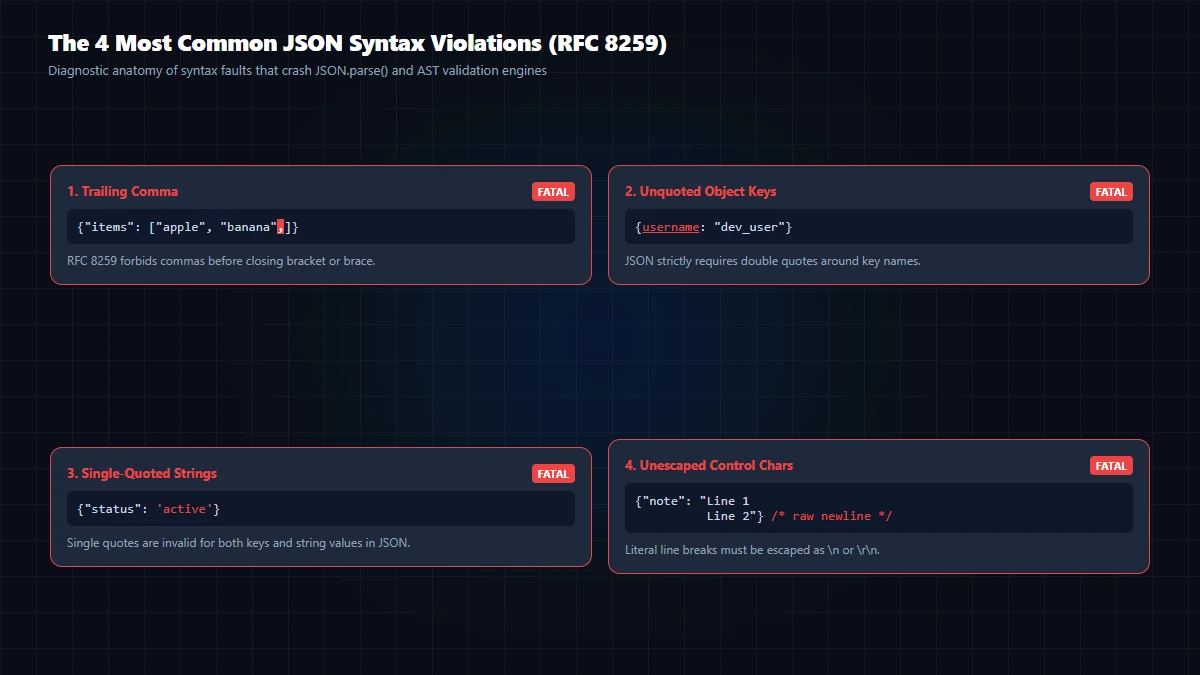
{
  "name": "GoToolstack",
  "active": true,
}
Engine Diagnostic: Trailing comma in object is not allowed at position 45 (near ""active": true,
}")
✓ Valid Fix: In RFC 8259, commas are element separators, not terminators. Remove the comma after the final value before the closing } or ]:
{
  "name": "GoToolstack",
  "active": true
}
Error 2: Single Quotes Instead of Double Quotes
× Invalid Input:
{'status': 'success'}Engine Diagnostic: Expected string quote at position 1 (near "{'status': 'success'}")
✓ Valid Fix: JavaScript permits single quotes for string literals, but RFC 8259 Section 7 strictly requires double quotes (") for all object keys and string values:
{"status": "success"}Error 3: Unquoted Object Keys
× Invalid Input:
{count: 42}Engine Diagnostic: Expected string key in object at position 1 (near "{count: 42}")
✓ Valid Fix: Unlike relaxed JavaScript object literals, every JSON object key must be explicitly enclosed in double quotes:
{"count": 42}Error 4: Invalid Escape Sequences & Unescaped Backslashes
× Invalid Input:
{"path": "C:\programs\data.json"}Engine Diagnostic: Invalid escape sequence \p at position 13 (near "{"path": "C:\programs..."}")
✓ Valid Fix: RFC 8259 only recognizes ", \\, /, \b, \f, \n, \r, \t, and 4-digit hexadecimal unicode escapes \uXXXX. Raw Windows backslashes must be escaped with double backslashes:
{"path": "C:\\programs\\data.json"}Error 5: Comments Inside JSON Payload
× Invalid Input:
// Server settings
{"port": 8080}
Engine Diagnostic: Unexpected token '/' at position 0 (near "// Server settings")
✓ Valid Fix: Standard JSON has no syntax for comments (neither // nor /* */). All comments must be stripped prior to transmitting or formatting:
{"port": 8080}5. The 64-Bit Integer Trap: Lossless Token Preservation vs. Downstream Consumer Limits
Standard JavaScript numbers are stored as IEEE 754 64-bit double-precision floating-point values. The maximum safe integer boundary is:
Number.MAX_SAFE_INTEGER = 9,007,199,254,740,991 (2^53 - 1)When an API provides large 64-bit identifiers, database primary keys, or blockchain transaction hashes (e.g. 9007199254740993), a native JSON.parse() call silently rounds the number to 9007199254740992, discarding precision without throwing an error.
GoToolstack's JSON engine utilizes a custom lossless parser that captures numeric literals as verbatim text tokens. When re-stringifying to formatted or minified output, the exact digits are preserved. However, this preservation does not guarantee downstream safety: if a downstream service, database driver, or client application subsequently parses that JSON payload with a standard float64 parser, precision loss will still occur. In distributed architectures, 64-bit identifiers should be transmitted as strings (e.g. "9007199254740993") to ensure cross-system integrity.
6. Duplicate Object Keys & Downstream Parser Ambiguity
Consider an object containing duplicate keys:
{"user": "alice", "user": "bob"}GoToolstack's AST parser stores each key-value pair as a distinct entry in order without silently deleting preceding keys. However, RFC 8259 Section 4 explicitly notes that duplicate key handling is unpredictable across different software:
- Certain parsers keep only the first key and ignore subsequent duplicates.
- Many standard dictionary implementations (including JavaScript's
JSON.parse()and Python'sjson.loads()) overwrite earlier values and retain only the last key. - Certain strict parsers reject the document completely with a syntax error.
The fact that GoToolstack preserves duplicate entries in its formatted output does not mean receiving systems will interpret them identically. Production JSON payloads should always maintain unique keys.
7. Technical Limitations & Tool Boundaries
Browser RAM and Large Payloads: Formatting minified JSON payloads exceeding 50 MB can momentarily freeze the browser's UI thread during DOM string allocation. For multi-gigabyte log archives, streaming command-line tools like jq are recommended.
- Two-Pane Editor with Dedicated Schema Tab: The tool provides a clean, two-pane text editor with active diagnostics and a dedicated JSON Schema validator tab (Draft-07 & Draft 2020-12). It does not contain a collapsible DOM tree viewer.
- Disallowed Values:
NaN,Infinity, and-Infinityare not permitted in RFC 8259. JavaScriptundefined, functions, and circular references cannot be represented. - Client-Side Execution: All parsing and AST reformatting run entirely in local browser memory. No payload text is sent to remote servers or logged.
Technical References & Official Standards
- IETF RFC 8259: The JavaScript Object Notation (JSON) Data Interchange Format (Grammar, Lexical Parsing, and Unicode Handling).
- JSON Schema Organization: JSON Schema Core Specification Draft 2020-12 & Draft-07 (Validation vocabulary and structural constraints).
- ECMA-262 ECMAScript Standard: IEEE 754 Floating Point Representation & Number.MAX_SAFE_INTEGER 64-bit precision boundaries.